Transparent LCD Display × AI Self-Service Photo Booth
Every visitor leaves with their own composite video
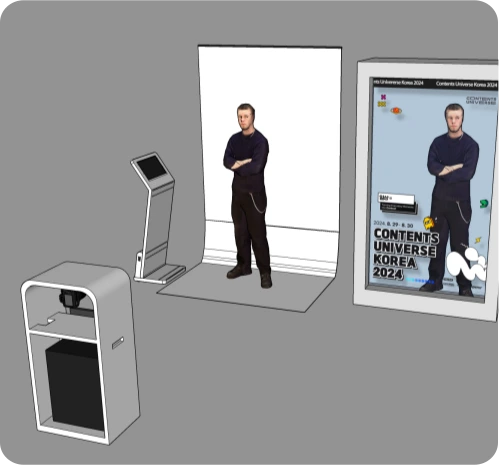
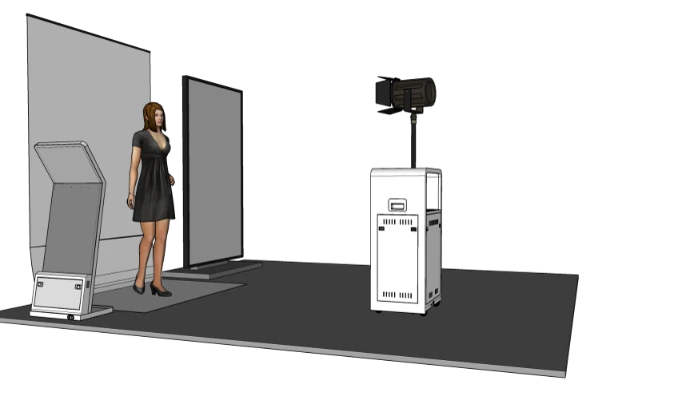
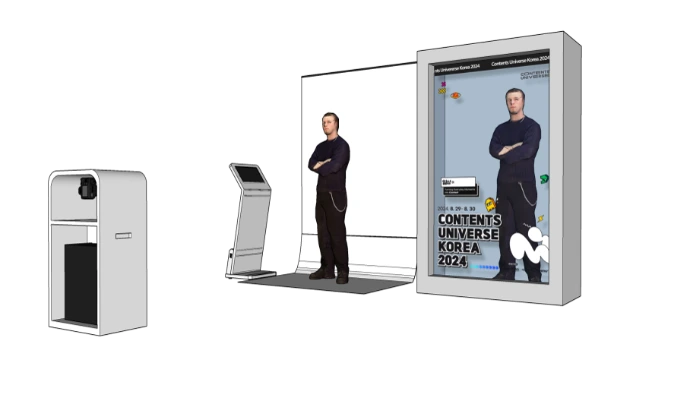
A touch kiosk, a camera and lighting rack, and a Transparent LCD Showcase work together to create a hologram-like 3D effect. In about one minute, visitors choose a theme, record, and see themselves composited in real time, then scan a QR code to take the video home. The booth runs unattended with no consumables, ideal for pop-up stores, exhibitions, and permanent experience centers.
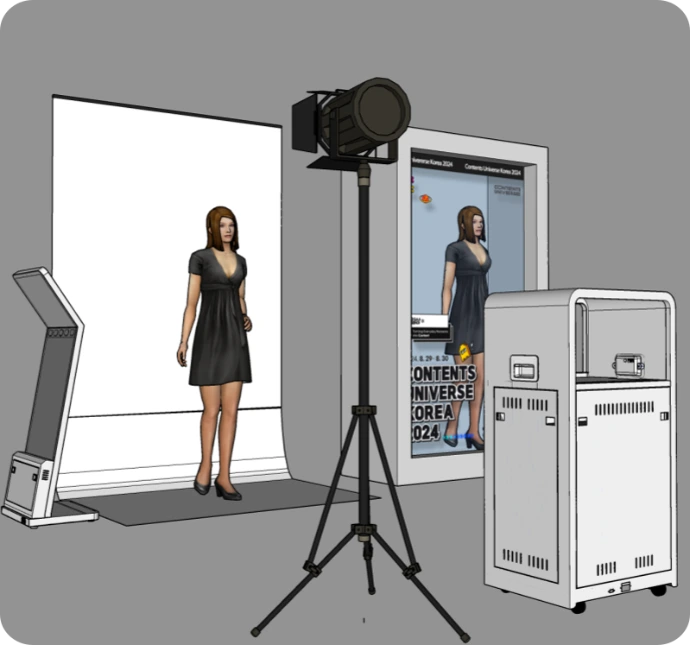
From “taking a photo” to “taking home a video”
Traditional photo booths only produce still prints and need constant paper and ink refills plus on-site staff. This system composites the visitor’s live image with themed animation and shows it on a Transparent LCD Display, so visitors appear to be standing inside the scene. When recording ends, they download the digital video with a QR code.
- Video, not just a photo: Visitors share the frame with themed characters and animated scenes, which makes them far more likely to post on social media.
- No consumables, no staff: QR video delivery has no printing cost and needs no operator on site.
- An eye-catching display: The recording is mirrored to a large Transparent LCD Showcase, which draws crowds on its own.
- Remote maintenance: Software issues and theme updates are handled remotely, suitable for multiple sites or long-term installations.
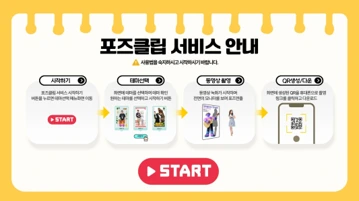
Four self-service steps for visitors
From choosing a theme and starting the recording to generating a QR code and sending the video by email (optional), visitors complete everything on the 15-inch touchscreen.
Tap to Start
Press “Start” on the kiosk to begin.
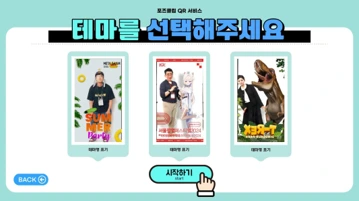
Choose a Theme
Swipe through theme videos and pick a scene.
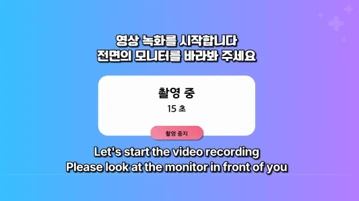
Record & Composite
The camera feed is composited with the theme video in real time and recorded automatically for about 15–20 seconds.
Scan to Download
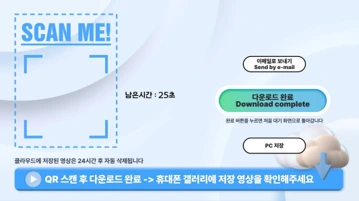
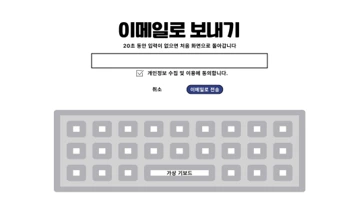
A QR code appears on screen; scan it to download the video, or enter an email address to receive it.
15-inch Touchscreen UI
Visitors handle everything themselves, from choosing a theme, starting and ending the recording, and generating the QR code to sending the video by email (optional).
Theme Updates
New themes are added to the QR service every six months and are ready to use as soon as they go live.
Custom themes for events or brands can be produced on request (additional fee).
Software, hardware rack, and touch kiosk in one package
Automated Operation Software
An unattended photo-booth interface: visitors record a video inside a theme and download it on site with a QR code.
- Visitor interface
- QR cloud download service
- 10 themes included
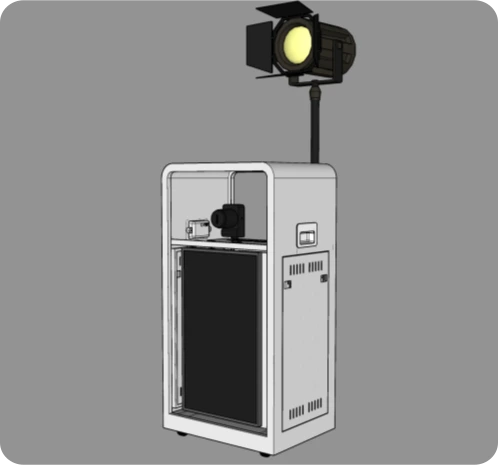
Hardware Rack
All operating hardware packaged in a steel-frame enclosure on casters.
- Camera, lighting, preview monitor, operating PC
- Mobile, easy to move between venues
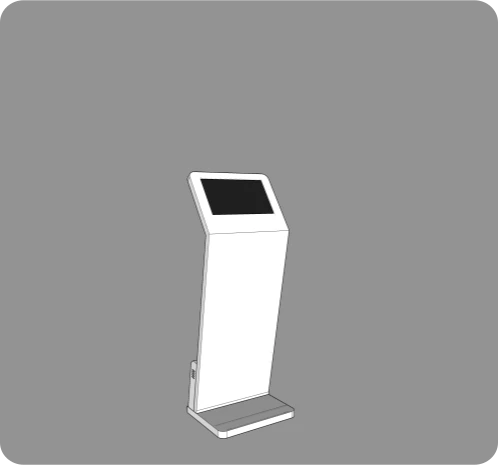
15-inch Touch Kiosk
Placed beside the shooting area, the touchscreen guides visitors through every step.
- 15-inch touchscreen
- Intuitive, easy-to-use design
Complete Package
| Item | Details |
|---|---|
| Touch kiosk | 15-inch touchscreen for visitors |
| Camera set | Mirrorless camera with adapters and cables |
| Preview monitor | 27-inch, mounted in the rack so visitors can see their composite image in real time |
| Hardware rack | Steel enclosure, mobile |
| Backdrop | White backdrop (1,500 mm wide or more) on a portable stand |
| Lighting | Continuous light with stand |
| Operating PC | Runs the operation software; supports AR and AI filters |
| Software | Automated operation program, 10 themes, QR server service |
| Display (optional) | Transparent LCD Showcase, 3D spatial display, or standard digital signage |
Signal flow from camera capture to Transparent LCD display
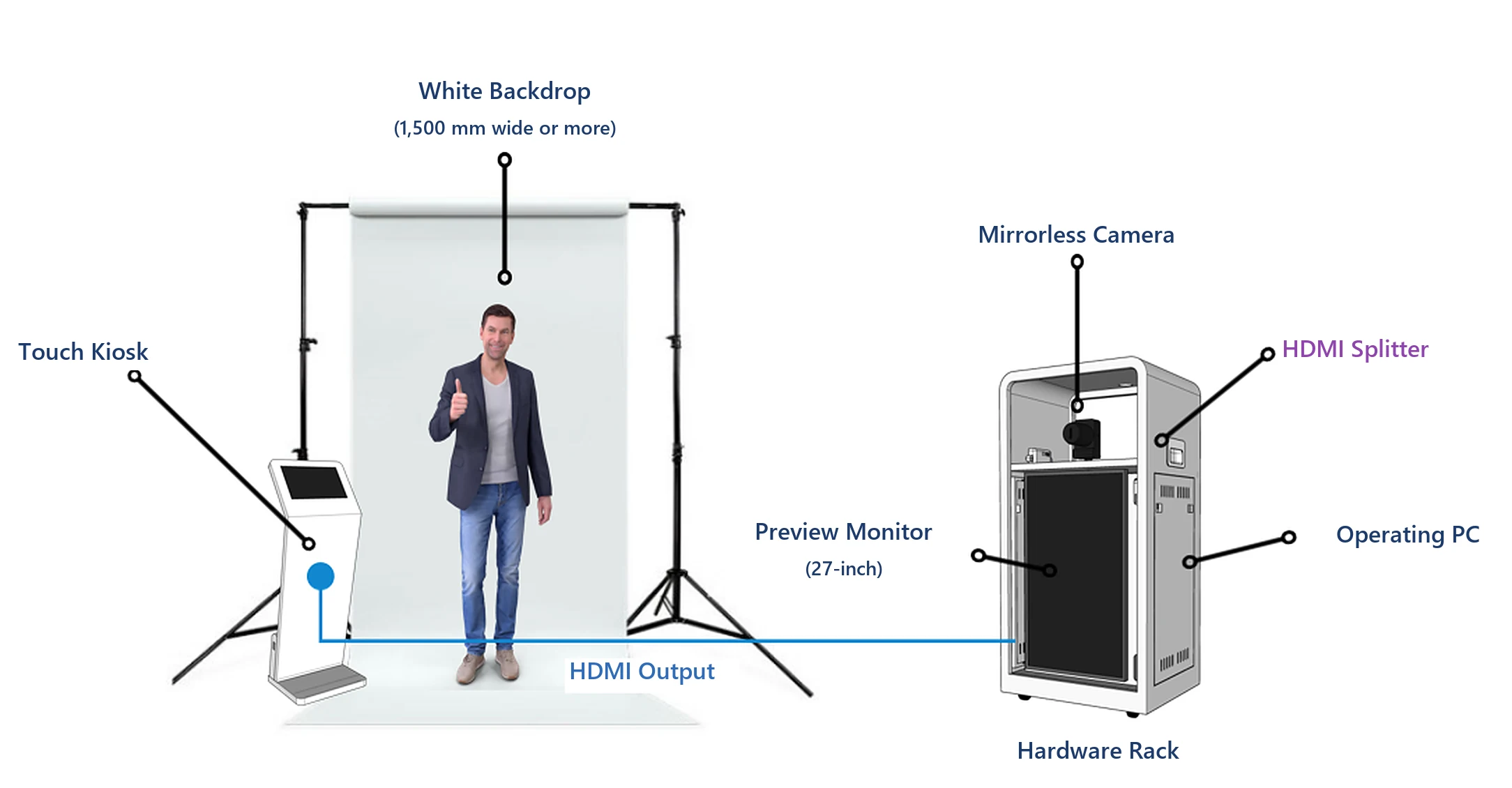
Image Processing
- The camera feed enters the operating PC through a capture card
- AI live style filters are applied (optional)
- The feed is composited with theme videos and characters in real time
- The HDMI splitter sends the same output to the preview monitor and the display
Automated Operation
- The operation software launches automatically when the PC boots; staff only need to switch on the power
- Remote PC management for troubleshooting
- Ongoing software updates improve both visitor and admin modes
- Quality control across development, testing, and deployment
Choose a display to fit your space and budget
The recording can be shown on different types of displays, from a Transparent LCD Showcase to standard digital signage.
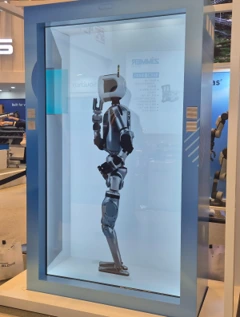
86-inch Transparent LCD Showcase
- Size: W1,282 × H2,287 × D600 mm
- Weight: 160 kg
- 4K resolution · 420 nits
- 10-point touch
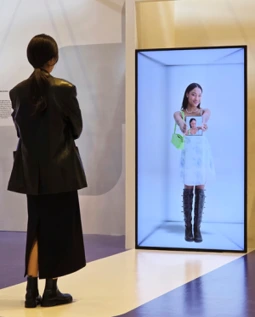
85-inch 3D Spatial Display
- Size: W1,101 × H1,920 × D52 mm
- Weight: 50 kg
- 4K resolution · 500 nits
- Virtual 3D spatial effect, B2B commercial design
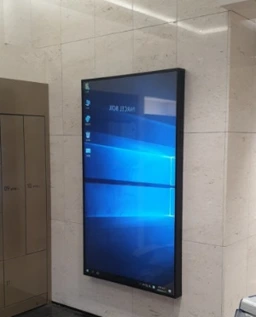
Standard Portrait Digital Signage
- Wall-mounted or floor-standing
- Size chosen to fit the venue
- A cost-effective display option
For smaller spaces, a 55-inch Transparent LCD Showcase is also available. Contact us for specifications.
AI live filters and photo printing
AI Live Style Filters
Transforms visitors into anime, comic, game-character, and other styles in real time. 36 filters are currently available, with more on the way; custom brand filters can also be developed.
Recommended PC: RTX 4090 graphics card, 32 GB RAM or more, 8-core CPU or better.
Photo Printing
Add a photo printer: the system prompts the pose at a set moment in each theme, captures the frame, and prints it automatically, ideal for events that need a physical souvenir.
Fresh content, uninterrupted operation
- Before delivery: Themes are produced, loaded into the system, and tested before handover.
- Regular updates: New themes are added to the QR service every six months and are ready to use when released.
- Custom themes: Produced for events, brands, or IP characters on request (additional fee).
- Remote updates: Theme updates and new features are delivered online.
Data Retention
| Data | Retention |
|---|---|
| Recorded video (cloud server) | 48 hours |
| Recorded video (local) | 10 days |
| Email data | 1 month |
Permanent installations and events overseas
The system has been deployed at pop-up stores, exhibitions, and permanent experience centers across South Korea, covering IP character marketing, education, and corporate showcases:
- CYCODE pop-up store
- RE:REVOLUTION pop-up store
- CGV Yongsan virtual idol concert promotion
- PLAVE fan café (permanent)
- Iksan Youth City Hall XR showroom (permanent)
- Seodaemun Prison History Hall (permanent)
- Contents Universe Korea
- I Love Character exhibition
- V Festival (SETEC)
- AK Plaza Hongdae / Space V (permanent)
- Binggrae pop-up store
- Corporate exhibition photo zone, Gumi
- Kyungbok University exhibition
- Changdong AI Science Center virtual experience zone (permanent)
- Seoul Metropolitan Office of Education event
- Hyundai Glovis exhibition
- tvN “Show Me The Money” virtual live
- Seoul AI Festival experience zone
Photo Gallery
Click a photo to enlarge it; use the arrow keys or swipe to browse.
Which spaces is it suited for?
Planning a Transparent LCD interactive photo experience?
Tell us your venue size, event dates, and expected visitor numbers, and we will recommend the right display and system configuration with a quotation.
Transparent LCD Display × AI Self-Service Photo Booth
Every visitor leaves with their own composite video
A touch kiosk, a camera and lighting rack, and a Transparent LCD Showcase work together to create a hologram-like 3D effect. In about one minute, visitors choose a theme, record, and see themselves composited in real time, then scan a QR code to take the video home. The booth runs unattended with no consumables, ideal for pop-up stores, exhibitions, and permanent experience centers.
From “taking a photo” to “taking home a video”
Traditional photo booths only produce still prints and need constant paper and ink refills plus on-site staff. This system composites the visitor’s live image with themed animation and shows it on a Transparent LCD Display, so visitors appear to be standing inside the scene. When recording ends, they download the digital video with a QR code.
- Video, not just a photo: Visitors share the frame with themed characters and animated scenes, which makes them far more likely to post on social media.
- No consumables, no staff: QR video delivery has no printing cost and needs no operator on site.
- An eye-catching display: The recording is mirrored to a large Transparent LCD Showcase, which draws crowds on its own.
- Remote maintenance: Software issues and theme updates are handled remotely, suitable for multiple sites or long-term installations.
Four self-service steps for visitors
From choosing a theme and starting the recording to generating a QR code and sending the video by email (optional), visitors complete everything on the 15-inch touchscreen.
Tap to Start
Press “Start” on the kiosk to begin.
Choose a Theme
Swipe through theme videos and pick a scene.
Record & Composite
The camera feed is composited with the theme video in real time and recorded automatically for about 15–20 seconds.
Scan to Download
A QR code appears on screen; scan it to download the video, or enter an email address to receive it.
15-inch Touchscreen UI
Visitors handle everything themselves, from choosing a theme, starting and ending the recording, and generating the QR code to sending the video by email (optional).
Theme Updates
New themes are added to the QR service every six months and are ready to use as soon as they go live.
Custom themes for events or brands can be produced on request (additional fee).
Software, hardware rack, and touch kiosk in one package
Automated Operation Software
An unattended photo-booth interface: visitors record a video inside a theme and download it on site with a QR code.
- Visitor interface
- QR cloud download service
- 10 themes included
Hardware Rack
All operating hardware packaged in a steel-frame enclosure on casters.
- Camera, lighting, preview monitor, operating PC
- Mobile, easy to move between venues
15-inch Touch Kiosk
Placed beside the shooting area, the touchscreen guides visitors through every step.
- 15-inch touchscreen
- Intuitive, easy-to-use design
Complete Package
| Item | Details |
|---|---|
| Touch kiosk | 15-inch touchscreen for visitors |
| Camera set | Mirrorless camera with adapters and cables |
| Preview monitor | 27-inch, mounted in the rack so visitors can see their composite image in real time |
| Hardware rack | Steel enclosure, mobile |
| Backdrop | White backdrop (1,500 mm wide or more) on a portable stand |
| Lighting | Continuous light with stand |
| Operating PC | Runs the operation software; supports AR and AI filters |
| Software | Automated operation program, 10 themes, QR server service |
| Display (optional) | Transparent LCD Showcase, 3D spatial display, or standard digital signage |
Signal flow from camera capture to Transparent LCD display
Image Processing
- The camera feed enters the operating PC through a capture card
- AI live style filters are applied (optional)
- The feed is composited with theme videos and characters in real time
- The HDMI splitter sends the same output to the preview monitor and the display
Automated Operation
- The operation software launches automatically when the PC boots; staff only need to switch on the power
- Remote PC management for troubleshooting
- Ongoing software updates improve both visitor and admin modes
- Quality control across development, testing, and deployment
Choose a display to fit your space and budget
The recording can be shown on different types of displays, from a Transparent LCD Showcase to standard digital signage.
86-inch Transparent LCD Showcase
- Size: W1,282 × H2,287 × D600 mm
- Weight: 160 kg
- 4K resolution · 420 nits
- 10-point touch
85-inch 3D Spatial Display
- Size: W1,101 × H1,920 × D52 mm
- Weight: 50 kg
- 4K resolution · 500 nits
- Virtual 3D spatial effect, B2B commercial design
Standard Portrait Digital Signage
- Wall-mounted or floor-standing
- Size chosen to fit the venue
- A cost-effective display option
For smaller spaces, a 55-inch Transparent LCD Showcase is also available. Contact us for specifications.
AI live filters and photo printing
AI Live Style Filters
Transforms visitors into anime, comic, game-character, and other styles in real time. 36 filters are currently available, with more on the way; custom brand filters can also be developed.
Recommended PC: RTX 4090 graphics card, 32 GB RAM or more, 8-core CPU or better.
Photo Printing
Add a photo printer: the system prompts the pose at a set moment in each theme, captures the frame, and prints it automatically, ideal for events that need a physical souvenir.
Fresh content, uninterrupted operation
- Before delivery: Themes are produced, loaded into the system, and tested before handover.
- Regular updates: New themes are added to the QR service every six months and are ready to use when released.
- Custom themes: Produced for events, brands, or IP characters on request (additional fee).
- Remote updates: Theme updates and new features are delivered online.
Data Retention
| Data | Retention |
|---|---|
| Recorded video (cloud server) | 48 hours |
| Recorded video (local) | 10 days |
| Email data | 1 month |
Permanent installations and events overseas
The system has been deployed at pop-up stores, exhibitions, and permanent experience centers across South Korea, covering IP character marketing, education, and corporate showcases:
- CYCODE pop-up store
- RE:REVOLUTION pop-up store
- CGV Yongsan virtual idol concert promotion
- PLAVE fan café (permanent)
- Iksan Youth City Hall XR showroom (permanent)
- Seodaemun Prison History Hall (permanent)
- Contents Universe Korea
- I Love Character exhibition
- V Festival (SETEC)
- AK Plaza Hongdae / Space V (permanent)
- Binggrae pop-up store
- Corporate exhibition photo zone, Gumi
- Kyungbok University exhibition
- Changdong AI Science Center virtual experience zone (permanent)
- Seoul Metropolitan Office of Education event
- Hyundai Glovis exhibition
- tvN “Show Me The Money” virtual live
- Seoul AI Festival experience zone
Photo Gallery
Click a photo to enlarge it; use the arrow keys or swipe to browse.
Which spaces is it suited for?
Planning a Transparent LCD interactive photo experience?
Tell us your venue size, event dates, and expected visitor numbers, and we will recommend the right display and system configuration with a quotation.